
A CD ladder calculator Excel spreadsheet tracks separate certificates of deposit, estimates their maturity values, and shows when each portion of your savings becomes available. You can build one by entering each CD’s principal, APY, opening date, and term, then using Excel formulas to calculate interest and maturity dates.
A free, editable workbook provides a reusable place to review account details instead of recalculating every certificate when another one expires. A useful template separates input cells from calculated results, so a change in the savings plan is easy to inspect.
You can download a working file and keep a copy for your own use. If you prefer Google Sheets, you can import an Excel version, then check its formulas and date formats. Neither program retrieves current bank offers just because it contains a CD ladder.
⬇ Download the free CD Ladder Calculator Excel Spreadsheet
How Do You Set Up a CD Ladder Spreadsheet in Excel?
Set up a CD ladder spreadsheet by entering one certificate per row, with separate fields for its purchase amount, opening date, interest rate, and maturity. In Microsoft Excel, a layout of 10 rows can be a practical starting point, but it is not a limit.
Before entering your CD details into Excel, review our complete guide on how to build a CD ladder to understand the maturity schedule and reinvestment process.
To organize your certificates, add fields for expected value, the date each deposit becomes available, and what you eventually do with it. These staggered deposits form a maturity schedule that can be sorted by date. You can also maintain a small dashboard or create visible alerts with conditional formatting.
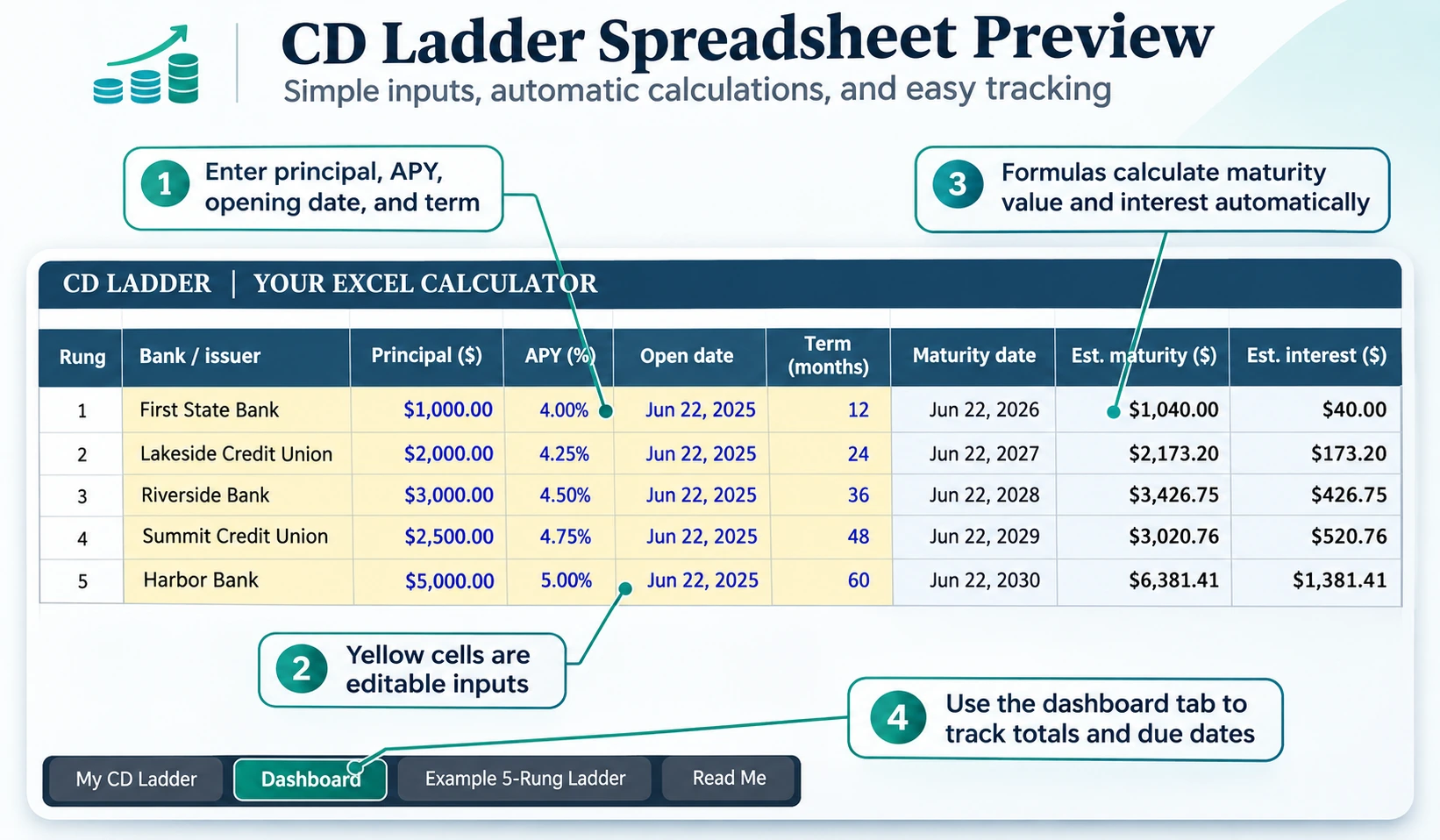
Here are three example schedules documented by Fidelity. The schedule describes initial maturities, not a promise that each CD earns a higher rate.
| Ladder horizon | Initial maturity rungs | Access pattern |
|---|---|---|
| 1-year | 3-month, 6-month, 9-month, 12-month | Quarterly |
| 2-year | 6-month, 12-month, 18-month, 24-month | Every six months |
| 5-year | 1, 2, 3, 4, and 5-year CDs | Annually |
Use the maturity dates supplied by the issuer as the definitive dates. A spreadsheet is a tracking aid, not a substitute for an account statement.
How Do You Calculate CD Maturity Value in Excel?
Calculate a CD’s maturity value by applying its annual percentage yield to the initial amount over the relevant fraction of a year. This estimates the future balance of a present investment under a constant yield assumption.
The calculation uses the starting principal, the funding date for tracking, and the CD term. A fractional period matters: an 18-month certificate runs for 1.5 years, not 18 years. A simple-interest shortcut can give a different result because the standard APY model accounts for compound growth.
-
Enter the opening deposit in B1.
-
Enter the disclosed annual yield in B2, formatted as a percent.
-
Enter the length in years in B3.
-
In B5, use
=B1*(1+B2)^B3to estimate maturity value. -
To subtract the opening amount from the final balance, use
=B5-B1for estimated interest.
If the term is entered in months instead, divide the number of months by 12 inside the exponent. Compare the result with the issuing bank’s official terms before making a decision.
Can Excel’s FV Function Calculate CD Growth?
Yes. Excel’s FV function can estimate CD growth from a one-time deposit when the rate and measurement periods are aligned. It provides an alternative to writing the exponent yourself.
For a single CD without additional contributions, the expression =FV(B2,B3,0,-B1) calculates a projected maturity value. If the length is expressed in months, use a matching monthly rate; if a formula uses an effective annual yield, express the duration in years. Otherwise, the result can diverge even though the spreadsheet returns a number.
For example, if B2 contains the effective annual APY and E2 contains the term in months, a monthly-period version is:
=FV((1+B2)^(1/12)-1,E2,0,-B1)
The FV calculation is a model of growth, not a statement of actual cash credited by a bank. For maturity dates, =EDATE(D2,E2) adds the term in months to the opening date in D2. You can copy the formulas down the sheet.
Check for typos and confirm that imported formulas remain compatible with the spreadsheet application you use.
Which CD Ladder Models Can You Manage in Excel?
Excel can manage short, intermediate, and longer-horizon CD ladder models, provided each maturity is recorded separately. The main design decision is how often you want funds to become available without selling a certificate early.
For shorter maturity periods, follow our mini CD ladder guide and record each short-term CD in a separate spreadsheet row.
The issuer matters as much as the spacing. Bank CDs may qualify for FDIC insurance, while qualifying credit union share certificates may have NCUA coverage. The usual federal limit is $250,000, subject to depositor, institution, and account-ownership rules. A workbook does not make a deposit protected; the underlying account must qualify.
A brokerage ladder may include certificates from multiple banks. Record whether a renewal instruction is active and whether the service offers automatic purchase of a replacement CD. An automatically refreshed schedule is not evidence that a new CD has actually been purchased.
You can also use Excel to track a monthly CD ladder, with a separate maturity date and interest estimate for every certificate.
When Should You Use Excel Instead of an Online CD Ladder Calculator?
Use Excel when you need an ongoing CD register; use an online calculator when you want a quick estimate without managing a file. These tools solve related but different tasks.
| Feature | Excel spreadsheet | Online CD ladder calculator |
|---|---|---|
| Per-CD terms and rates | Separate fields and columns | Depends on tool inputs |
| Ongoing maturity tracking | Editable history | Usually scenario-oriented |
| Adjusting assumptions | Flexible formulas | Typically faster |
| Transaction handling | Does not place deposits | Does not place deposits |
For example, a Fidelity Model CD ladder may have a defined reinvestment option, whereas a plain workbook only records your decision. You must follow the bank’s instructions and manually execute a change unless an eligible service has already been authorized to do so.
If you only need a quick estimate rather than an editable tracking file, use our free CD Ladder Calculator.
An online tool is useful for an initial calculation. The spreadsheet becomes more useful when the saver has multiple real certificates with different details to maintain.
Which Excel CD Ladder Calculation Errors Should You Check?
Check CD ladder formulas in a consistent order: validate the input values, match the time units, inspect the sign convention, and compare the results with the issuing institution’s statement.
A spreadsheet can appear precise even when its calculations use mismatched periods. For Excel FV, a negative starting value is often appropriate because it represents money paid into the investment. The function’s arguments must match the intended rate and length.
-
Verify the opening amount and whether the interest input represents APY or a different rate.
-
Check percentage entry and the number of compounding periods.
-
Review the opening date and expected maturity date.
-
Compare independent estimates before relying on the final figure.
For comparisons across several CDs, an average yield can hide material differences. Test separate scenarios using the rate attached to each rung rather than assuming every deposit earns the same percentage.
What Financial Risks Should a CD Ladder Spreadsheet Account For?
A CD ladder spreadsheet should track access to money, issuer terms, early-withdrawal consequences, and future rate uncertainty instead of presenting returns alone as the whole decision.
For instance, 4.25% is an illustrative APY used in a published spreadsheet example, not a current offer. The specific quoted yield belongs to the relevant product agreement. Different CD products at the same institution may use different maturities, interest-crediting terms, or early-access rules.
When a rung matures, the available renewal rate can differ from the earlier rate. A projection that assumes the old rate continues after maturity could overstate future balances. Record the new terms rather than letting a historical rate continue indefinitely.
Finally, the worksheet should record penalties or other restrictions described in the account agreement. An estimate cannot guarantee either liquidity or the amount finally paid.
Can You Get a Free CD Ladder Excel Template?
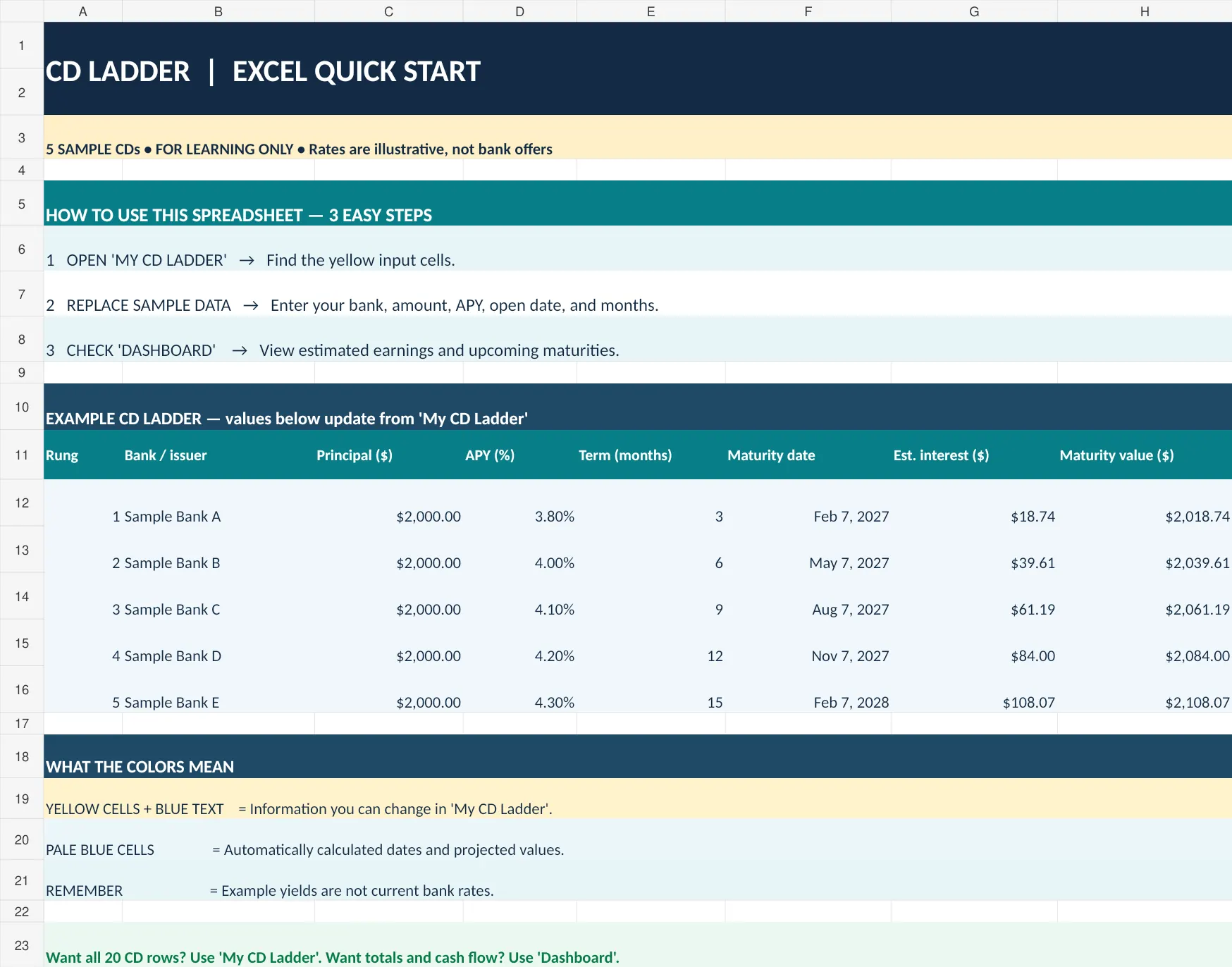
Yes. Downloadable templates are available, including a SooperTools spreadsheet described as a reusable Excel tracker. A prepared file can simplify planning and keep maturity records in one place.
⬇ Download the free CD Ladder Calculator Excel Spreadsheet
A browser calculator can be convenient for speed, but it usually does not retain a personalized portfolio ledger. A template is most useful when its date and financial functions are visible and editable so you can inspect the assumptions.
Will an Excel CD Ladder Spreadsheet Work in Google Sheets?
Yes. A conventional Excel CD ladder can generally be opened in Google Sheets, although every imported formula should be checked. Its flexibility is useful if you want custom views for individual CDs.
Date values imported as text may cause calculation errors. Inspect the percentage and date formatting, then compare a sample maturity result with the Excel version before relying on the transferred file.
Which APY Should You Enter for Each CD?
Enter the APY disclosed for the exact certificate you are modeling rather than using one assumed yield for the whole ladder. Confirm the figure with the issuing bank or credit union.
The input should be stored as a percentage. Do not replace the disclosed APY with a nominal interest rate without changing the method: APY already reflects the annualized effect of compounding. Distinguishing the two prevents misleading estimates.
Can an Excel CD Ladder Automatically Reinvest Matured CDs?
No. An ordinary Excel spreadsheet cannot independently place a new CD order just because a maturity date arrives. It can update a status field or hold a proposed reinvestment date.
Actual renewal depends on an account’s settings. Some brokerages, including Fidelity, offer an Auto Roll service for eligible certificates. Review the official disclosure, including early-withdrawal penalties, rather than treating a sheet’s forecast as proof that money was reinvested.
What Formula Calculates CD Interest in Excel?
For an APY-based CD estimate, calculate maturity value and subtract the original amount. A $10,000 deposit at 4.50% APY over 3 years has a rounded projected ending value of $11,412, meaning about $1,412 in earned interest.
Excel’s FV function offers another method for a single deposit, using zero periodic payments. Both approaches assume the stated yield remains applicable for the modeled term; actual bank calculations and terms control the payment.
1 thought on “CD Ladder Calculator Excel Spreadsheet: How Does It Work?”
Comments are closed.